shopify collections optimized – for busy merchants

the same Shopify collections and Categories – More revenue, less stress
  • One-click setup
  • Insights in 1 minute
how to sell more in shopify

Shopify collection data without expensive solutions

Promote and expand what sells. Notice and repair what doesn’t. No need for external consultants or complex spreadsheets. Just click on a collection and get the insights. No setup needed.

Intuitive Dashboards

See actionable collection data, at a glance.

Save Time & Effort

No setup. Get clear answers. Fast.

Optimize for Growth

Find out which collections have hidden potential.

Shopify collection data without expensive solutions

Promote and expand what sells. Notice and repair what doesn’t. No need for external consultants of complex spreadsheets. Just click, click, click.
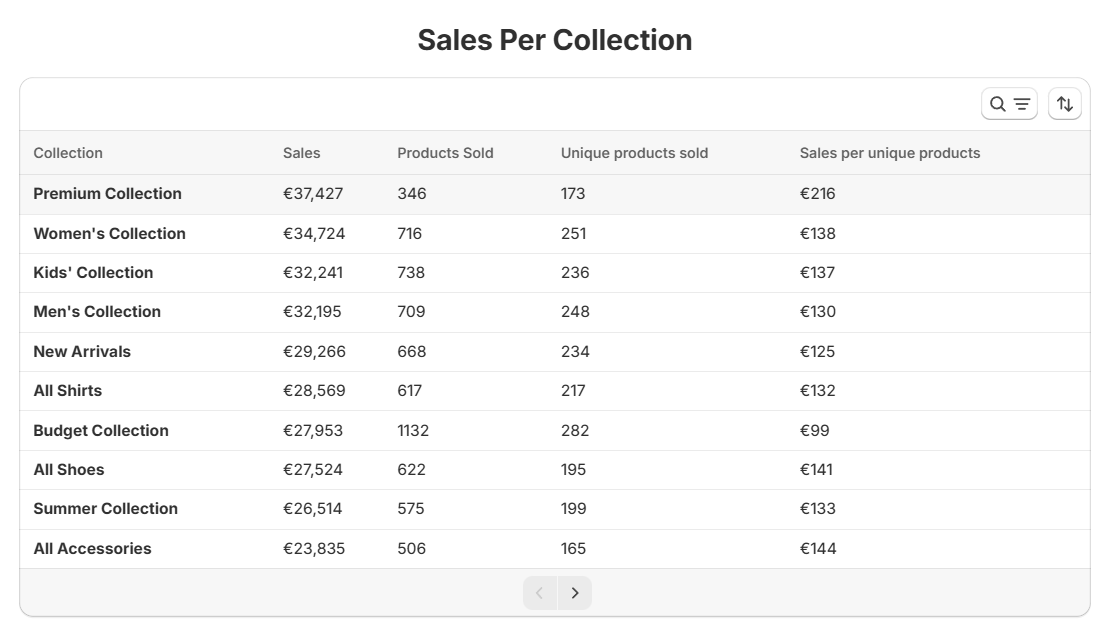
collections salesVsInv salesPerCollection 2

finally know which product categories sell

Powerful product category analytics with zero setup. We mirror your store’s main menu and automatically create your product hierarchy. Now you can see which categories actually sell well, and promote those categories and collections when the time is right.
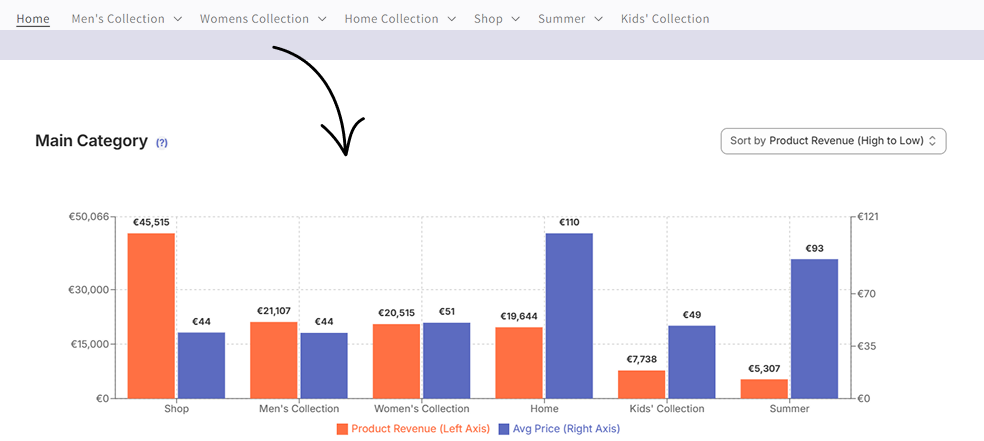
Shopify sales by product category sales chart

Shopify product hierarchy and subcategory analytics

Dig deeper into the subcategories and find underserved niches. With a click of a button.
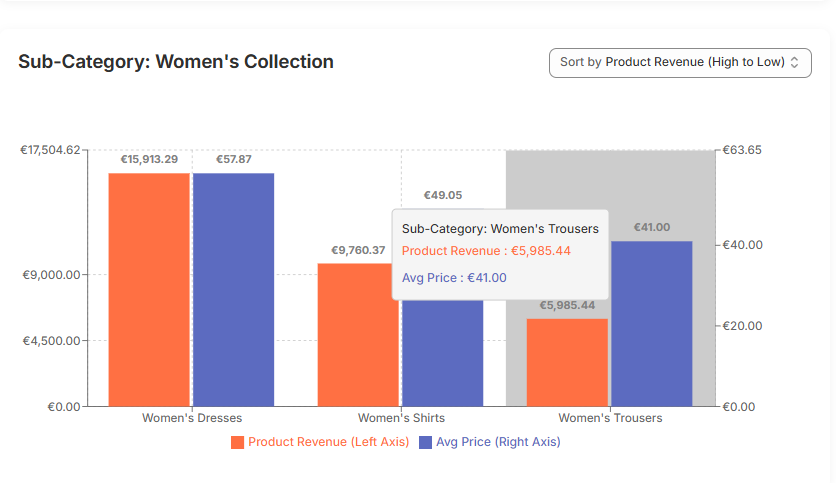
Shopify sales analysis dashboard showing sales by subcategory

product sales data – by each collection and category

Click on any Shopify collection, main or subcategory, and immidiately see what sells and what doesn’t. No need for export -> pivot -> frustration loop anymore. Portfolytics was created to make your work life easier, not harder. Try Shopify product analytics that actually is easy to start.
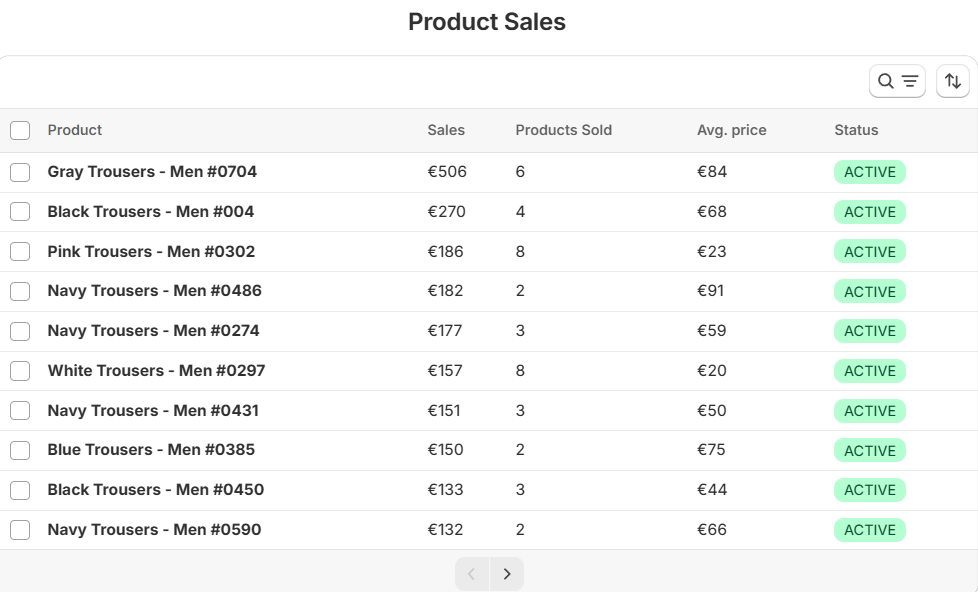
Shopify product sales analytics showing product sales in a collection

See how portfolytics works

Main Features

Number of collections online, how many of them had any sales, sales by collection, how many unique products each collection has. Even how many of those products have sold in your selected time period.

The app mirrors your main menu and creates the hierarchy automatically. You can just click through the categories with no extra setup. Note that his feature has only been tested with Shopify native menu and for now only supports two highest hierarchy levels.

The automatically created Shopify product hierarchy creates graphs you can click which makes it very easy to check info for any category. Compare how each category sells and click to see more more detailed data to find hidden sales potential.

In sales reports just click on any collection or category and see data such as sales, products sold or their average price in a table.

By analytics we mean easy-to-understand graphs and tables. Not data dumps that some data nerd created and forgot in your PowerBI or Looker Studio (sorry fellow data nerds).

Shopify sales analytics can be more than just about sales. See how many unique products you offer in each category or collection compared to the actual sales. Spot stuffed collections and wasted space.

Click on a collection and see product level sales data. See how many collections, products or vendors have sold. Filter by customer country or by vendor. We try to offer just the relevant stuff (but we do listen to feedback and requests).

Just install Portfolytics from the Shopify app store and grab a cup of coffee while the app syncs the data from your store (1 time process). Then you are eady to use it inside the Shopify Admin. The hierarchy will be created automatically (only tested with native main menu). Enjoy!

Pricing

  • 14-day free trial on every plan

Shopify Basic

$9

/month


  • All features
  • Customer Support
  • Free onboarding (Founders Only)

Shopify Grow

$19

/month


  • All features
  • Customer Support
  • Free onboarding (Founders Only)

Shopify Advanced

$49

/month


  • All features
  • Premium Support
  • Free onboarding (Founders Only)

Shopify Plus

$99

/month


  • All features
  • Premium Support
  • Premium onboarding

FAQ

14 days. And if you feel like you need more time just contact us and we will extend it for 15 days extra no questions asked.

We want to keep the app development as fast as possible and to offer all the features for every store. At the same time, we want the smaller stores that might just be starting out to also have a chance to use Portfolytics to grow. Bigger stores also mean more server and customer service costs for us.

None. Just head to our Shopify app store page and start your 30-day free trial.

A logical way to organize your products into main and subcategories (2+ levels). For example, you might have a category “Women -> Dresses -> Summer Dresses”. That is a 3-level product hierarchy in Shopify.

Install Portfolytics and try it for free. Then enjoy the one-click install to see visual sales and performance reports by main and subcategories or collections in your Shopify store. No strings attached.

In Portfolytics, head to Sales vs Inventory, where you can find out how each category sells compared to the amount of different products they have (Sales per Products Online). Portfolytics also let’s you analyze the sales performance of your collections.

Any store with more than a few products. Portfolytics has a free 30-day trial, and using it does not require any setup.

Start simple and think how you would want to see a similar store organized. Remember that categories are just collections (which you should already have) that have been reorganized to make more sense. Read this article for more details.

Customer Support – from Human to Human

Write us a message via chat and we will solve your problem.

  • Friendly service
  • Customer Support in English, Spanish and Finnish Languages
Shopify analytics app customer service

See Your product sales in each category

No setup required*
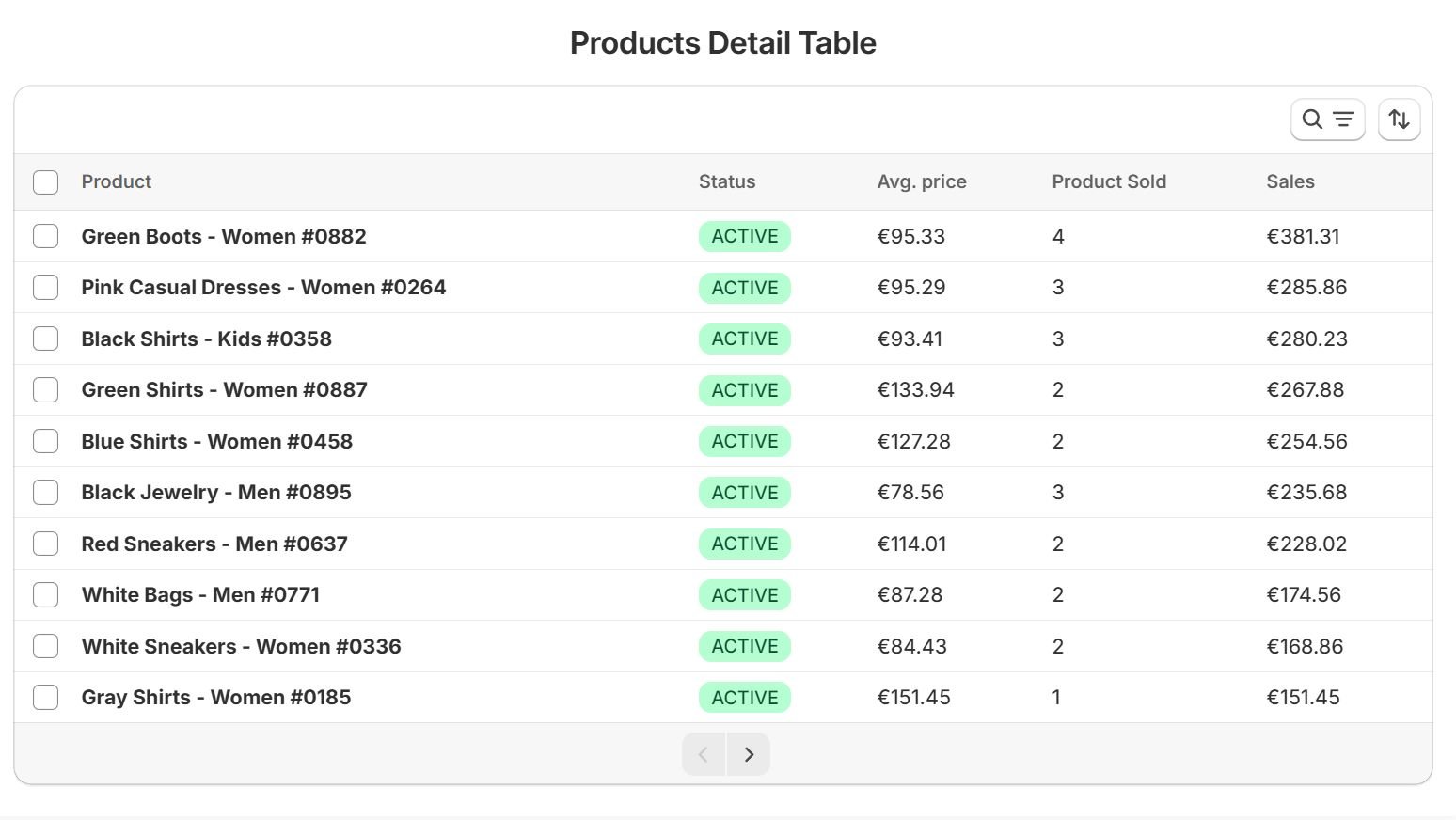
Shopify product level sales

*Works automagically with Shopify’s native main menu

Collection efficiency: Sales per product count

Also works with your main and subcategories
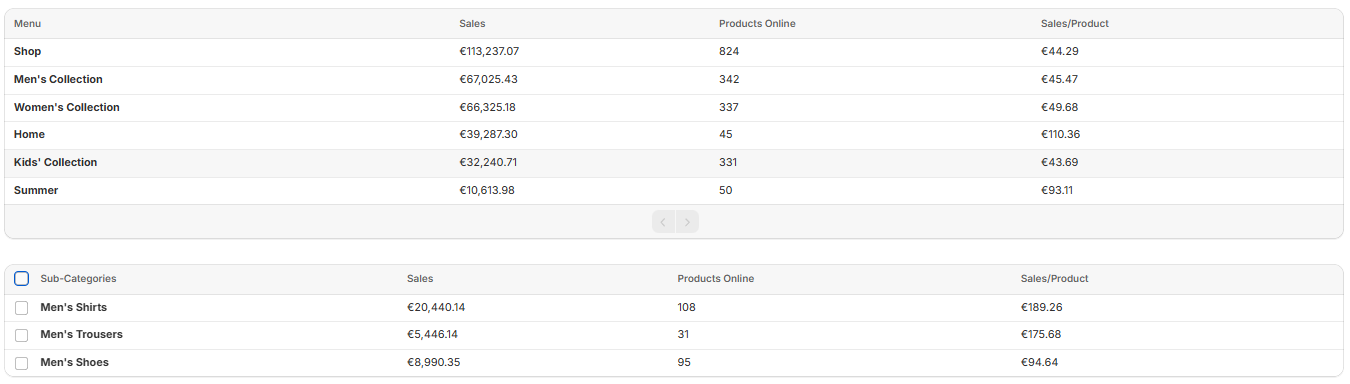
Shopify sales efficiency dashboard